
Change Log
Version 1.00.00-beta.1-167
- Tooltips for the bookmarks are in. Hover for about half a second and a popup with the URL, tags and notes will show. This can be turned off in your settings. You can also set the time before it shows the popup.
- Popups that show the URL and tags.
- Detail ellipse button on the end of bookmarks to show a detail dialog. The detail button shows a larger dialog with all the bookmark info including a small QR code you can click/tap to make full screen.
- Setting to turn tooltips off, show as a popup, or show as a popup and have the detail button.
Version 1.00.00-beta.1-165
- QR Codes! When you want to share a bookmark, you can now bring up the edit box (click the Edit Bookmarks icon bar button and use the new QR Code button to show a QR code of the URL. Note that your screen is set to Screen Wake Lock, preventing the device from dimming while the QR code is displayed.
- There is now a QR Code of Bookmark Squirrel in User menu > About if you want to share the URL of this site with someone.
- Added a copy to clipboard button in the URL field of the edit bookmark dialog.
- Fixed the drag lines when you are changing the order of bookmarks or topics in dark mode.
- Fixed a problem showing error messages in the login dialog.
- Fixed a problem when you change your password but supply the wrong password, now showing a specific message that the password was incorrect instead of a generic unable to change password message.
- Fixed a color issue with the group navigation dropdown in dark mode.
Version 1.00.00-beta.1-161
- New compact Spacing option to reduce spacing and make your topic cards take up less space.
- Changed layout so topic card heights are now even.
Version 1.00.00-beta.1-0150
- Welcome to the first public beta release!
- We now have site information on the landing page. So new users can hit https://bookmarksquirrel.com/ and see what the site is all about.
- Public beta sign-up page at https://bookmarksquirrel.com/beta-signup
- Fixed sort button appearing on dashboard cards.
- Changed the term private bookmark to hidden bookmark to avoid confusing the fact that bookmarks are always private unless you share them. Hidden means you are hiding them from the UI unless you choose to show hidden.
- Groups and topics can now be hidden. Any topics in a hidden group are not shown. Any bookmarks in a hidden topic are not shown.
- Fixed topic card reordering when there were hidden bookmarks.
- Fixed grid not sorting by group or topic.
Version 0.53.00-alpha.4
- Groups and topics that have no visible bookmarks will be hidden from the Group dropdown and the grid.
Version 0.52.00-alpha.4
- To kick off Alpha 4, you can now download Bookmark Squirrel as a PWA app called BMSq. This let's Android users save bookmarks on their mobile devices using their browsers Share feature. See Progressive Web App (PWA) for details.
- And we now have the ability to manually change the order of topics and bookmarks. See Reordering Topics and Bookmarks for details.
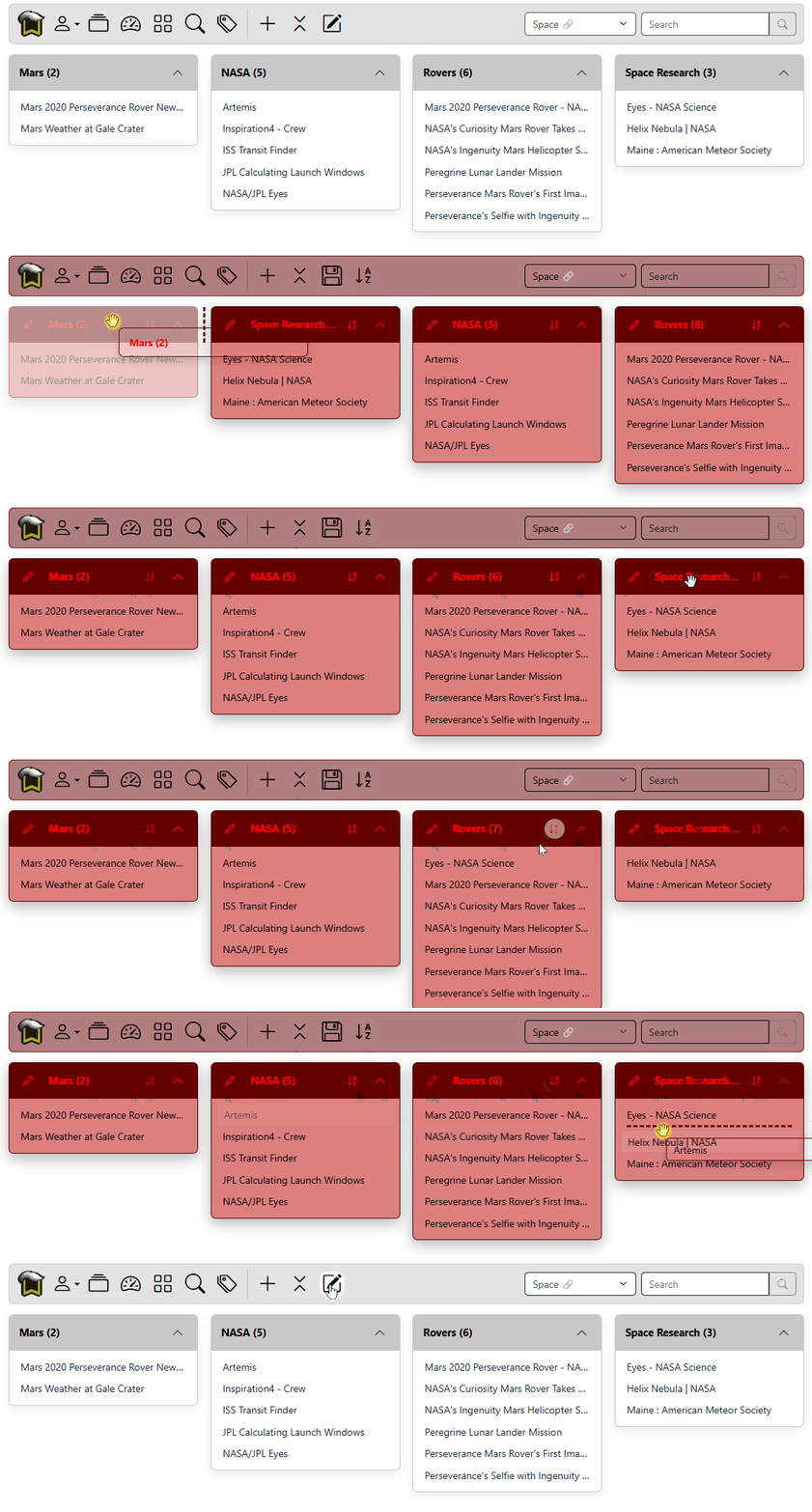
Version 0.51.00-alpha.3
- We now have a Progressive Web App (PWA) version of Bookmark Squirrel. This makes bookmarking a site on a mobile device almost as easy as using the browsers built-in bookmark add.
Version 0.50.00-alpha.3
- You can now use the Sign in with Google button to sign in. Your google email must be the same as the email address in your account.
- Bookmark Squirrel will now remember if you were using /group, /dashboard, /grid, /tags, and even what your last /advanceSearch was.
- Fixed group page showing first in dropdown instead of the last one that was displayed.
Version 0.49.00-alpha.3
- Server side security updates.
Version 0.48.00-alpha.3
- Added additional measures to improve CSRF safety. Thanks Chris!
- You can now logout of all your current sessions. When you select User menu > Logout it will prompt you to logout from the current session or all sessions. This handles the case where you need to logout from your office machine, but you sitting at home.
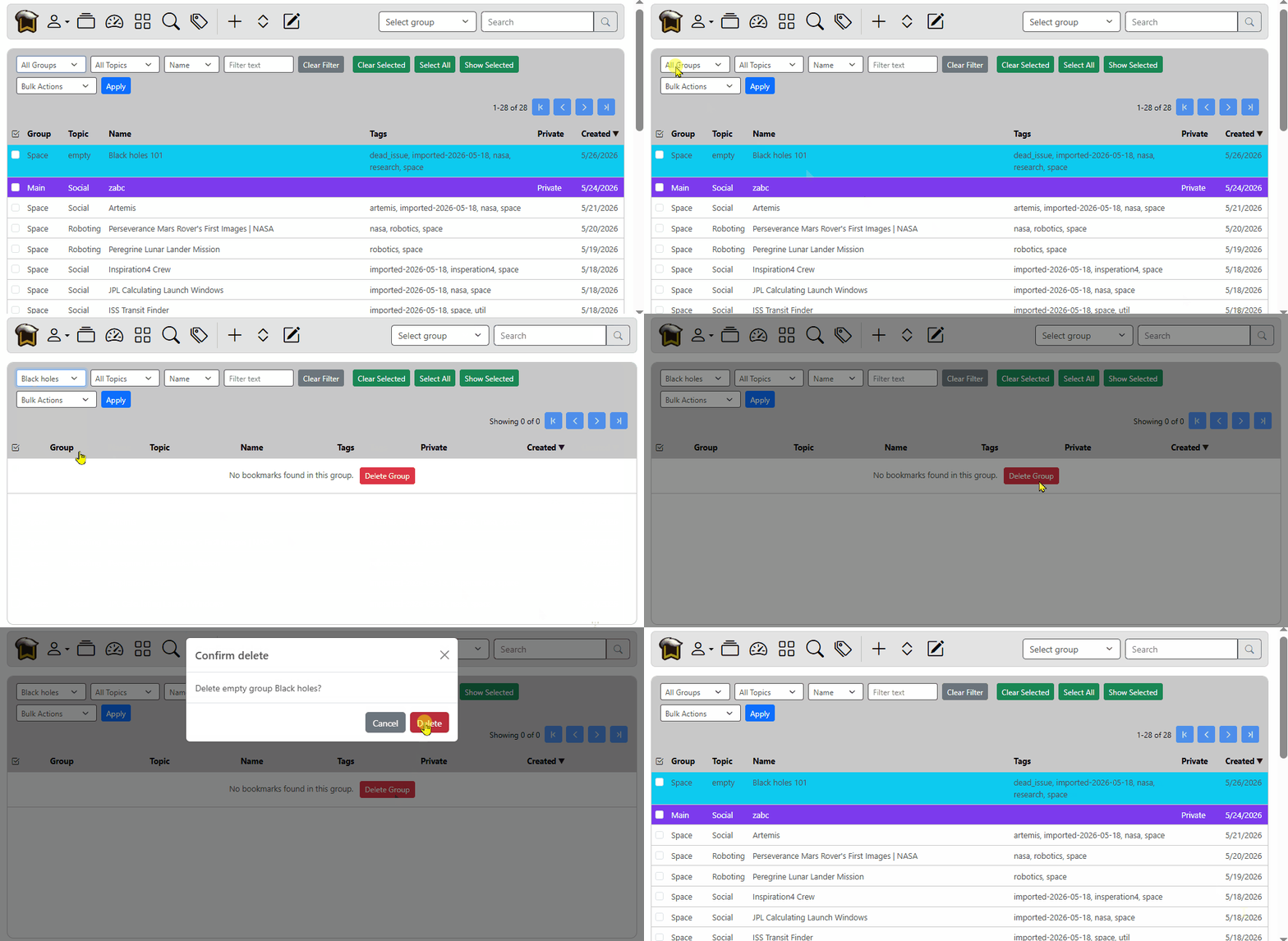
- You can now delete empty groups and topics from The Grid. When you select a group or topic from the filter dropdown, a delete button will appear if that group or topic is empty.
- Fixed the grid autocomplete dropdowns so they show groups and topics that have no bookmarks in them, should you want to repopulate them.
- Empty group pages now have a delete button. If you have hidden bookmarks that are not currently displayed, you get a message indicating as such.
- Removed the "Always expand" option because topics now remember their expanded/collapsed state. You can still use the Expand/Collapse All button in the icon bar.
- Empty topics now show "No bookmarks" when they are expanded, instead of a half open topic card with nothing in it.
Version 0.47.00-alpha.3
- Fixed the icon bars group dropdown so it navigates correctly. Replaced Dashboard with "Select group".
- Implemented free version restrictions. Dashboard, duplicate and dead link checks, and sharing bookmarks are no longer available for free accounts. Testers still have access to those features.
- Topic cards now remember their expended/collapsed state. So when you collapse a topic, or even all topics, when you switch back to the group, the topics will be collapsed.
- You'll notice the URL for group pages has changed. I decided it was safer to use an encoded URL so characters didn't need encoding and look odd. This also paves the way for being able to change the order of topics and bookmarks.
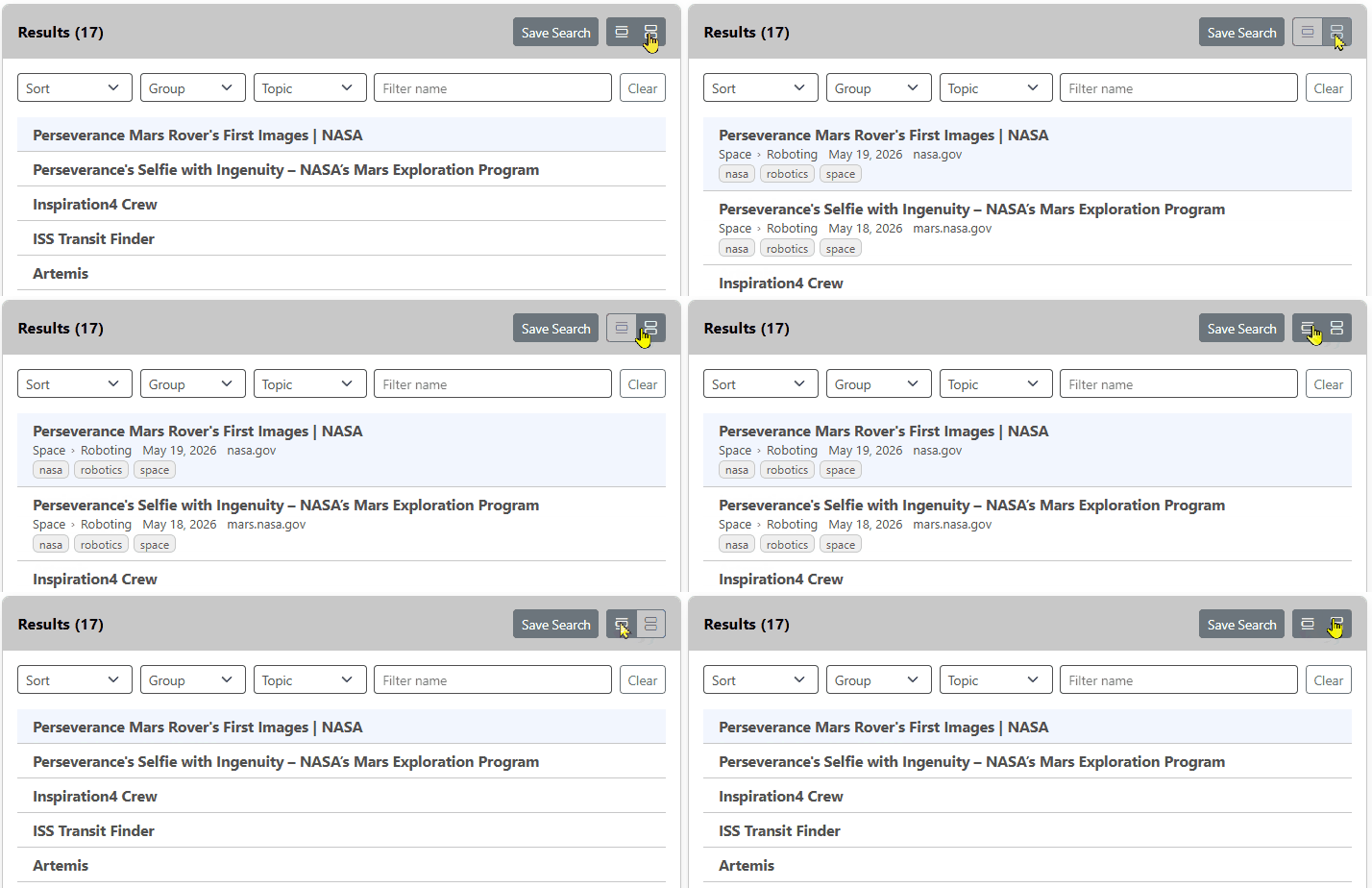
- Search results, I wanted to clean it up and get more results. So I moved the Save Search button into the Results title area, and put compact and detailed view buttons in to replace the Notes/Detail/URL buttons. See the image below. I think it's cleaner and easier to use.
Version 0.46.00-alpha.3
- Added Contact Support menu item and a Contact page in documentation.
- Fixed a user signup issue.
- Billing page now setup and takes sandboxed (not live) payments. Contact me before using the page.
Version 0.45.00-alpha.3
- Welcome to Alpha 3! One step closer a release version. Still lots of new stuff to come.
- Share Groups has arrived. You can now share a group and even password protect it if you wish.
- The group icon will now always return you to the last selected group. It was previously returning you to the dashboard if you had selected that.
- When you log back in, you will be returned to whichever group or dashboard you had selected last.
- Bookmark logo now takes you to a site landing page. Currently just a placeholder, but the flow of the icons working the way they should. Once in the landing page, you can return to the group you were last looking at.
- Fixed preset colors in add bookmark via bookmarklet.
Version 0.44.00-alpha.2
- New setting to show only the domain name instead of the entire URL in The Grid.
- Backend updates.
- New setting that allows you to launch bookmarks in a new window/tab or in the same tab. See Settings Launch New Window/Tab.
- You can now change the color of your bookmarks by clicking the Bookmark Color and choose a foreground and back background color. You can also use the default color combos. See Adding bookmarks.
- Fixed group and topic fields only showing 8 items. Now shows the entire list.
- Fixed help icons in settings.
Version 0.44.00-alpha.2
- Backend updates
- New squirrel tail!
- Going with the new grid and removed the old
Version 0.42.00-alpha.2
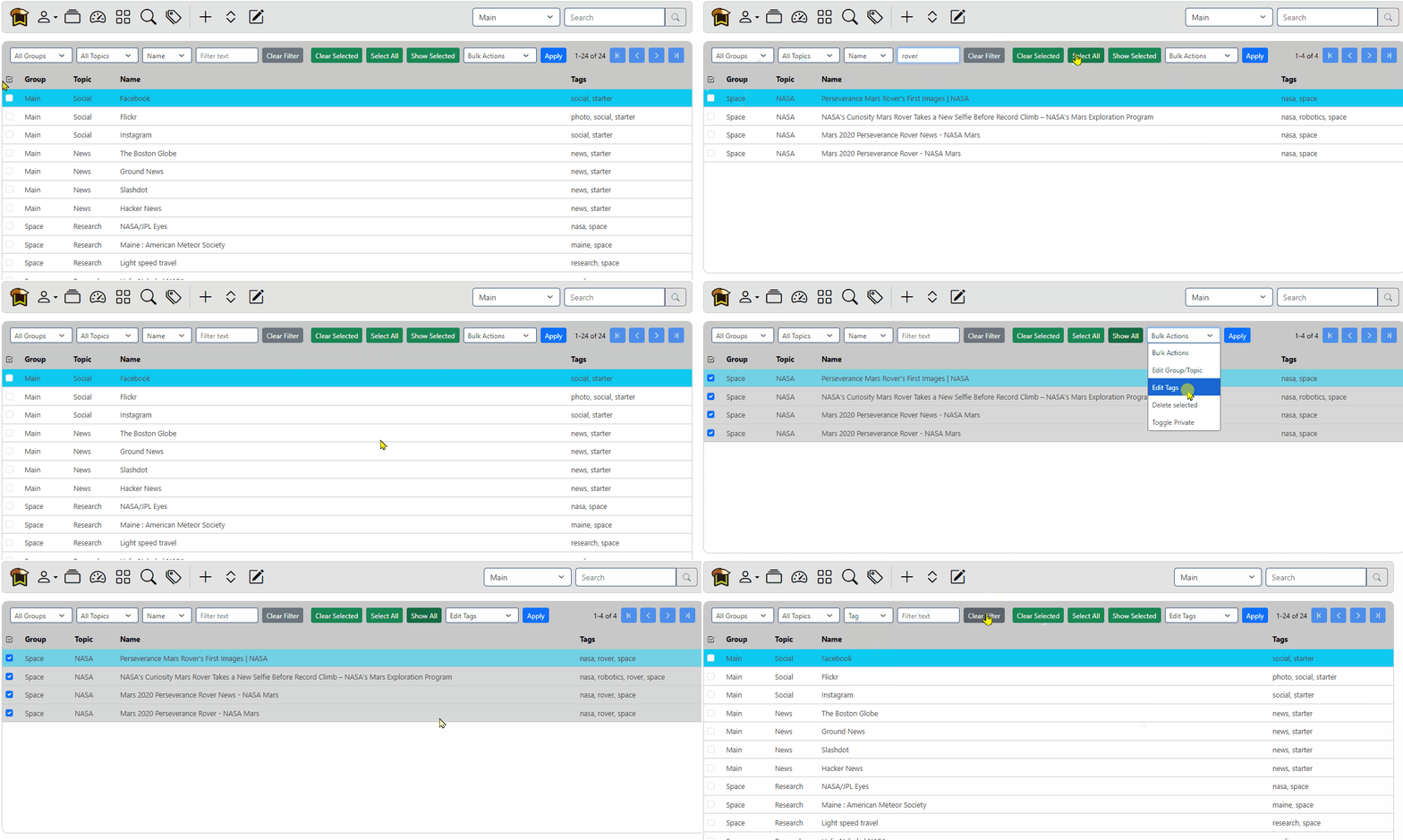
- Complete overhaul of The Grid. See updated docs for The Grid.
- Streamlined bulk operations,
- Now using checkboxes
- You can export selected bookmarks
- No more clicking and accidentally going to the site; double click to show bookmark.
- Use the arrow keys and X to quickly select bookmarks.
Version 0.41.00-alpha.2
- Fixed mobile login so it doesn't logout when you close the browser.
- UI Update with a cleaner look. Check out some before-after-0.41.00-alpha.2.
- New toolbar that flows from large to mobile without using a hamburger menu.
- Collapse/Expand all button and Edit/Done button moved to the toolbar.

- Search button combined with search field so it takes up less space.
- Group dropdown and search field flow under toolbar buttons on mobile screens.
- Spacing is more open in topic cards.
- You can now click anywhere in the URL title to go to the URL.
- Search page results are easier to read and tags are easier to identify.
- Filter options now flow correctly from wide to mobile screens.
- 6 topic card limit removed on group page. You can now expand your browser to super wide, and more topic cards will fit horizontally. Where 6 used to fit, I can now have 10.
Version 0.40.01-alpha.2
- Fixed grid view so it filters as you type again.
- Removed the "like,=,<,..." dropdown as all searches should be like.
Version 0.40.00-alpha.2
- Grid view Edit Links button now matches the dashboard and group pages.
- Moved the Edit Links button to the right side of the page so grid matches.
- Added a Read Later checkbox that automatically adds a read-later tag to your tag list.
- You can now see what tags have been clicked in light mode. This applies to Tagalicious Search add when you are adding a new bookmark.
- Tagalicious page can now sort the tags by count high to low, low to high, alphabetically A-Z, and Z-A. Look for the sort buttons on the right side of the page.
Version 0.39.00-alpha.2
- Logo update. Let me know what you think!
- You shouldn't need to re-login as often. When the server is updated, you use to have to re-login. You don't anymore.
- Add Bookmark no longer let's you save a bookmark if you only filled one of the group or topic.
- Always Expand in your User menu is now set by default.
- Added site title and version number to the login and signup pages.
- Dressed up the /about page.
- How to videos in documentation.
Version 0.37.00-alpha.2
- Removed add from the grid, and will add back in again later when it works correctly.
- Slightly larger logo in menu bar.
- Changed login to go to root / instead of trying to redirect where it thinks you logged in from, fix the 404 that keeps happening. This will change the login behavior when adding a bookmark and you are logged out. Will need to circle back and fix this properly.
- New Edit topic video in How to videos.
- Added a little sugar to the notes in documentation, and now also has a dark mode color.
- Removed Tagalicious from the docs until I get the text written.
- Updated "Username" menu to read "User" menu, since I use an icon now.
- New logo that's cleaner and easier to see as a favicon.
Version 0.36.00-alpha.2
- Switched to icons for menu bar to make localization easier in the future, and reduce footprint of menu items.
- Online documentation available now at https://bookmarksquirrel.com/documentation/.
Version 0.34.01-alpha.2
- Moved to the new domain of https://bookmarksquirrel.com
- You will need to update your bookmarklet! Delete your old one and install a new one at Adding bookmarks.
Version 0.32.00
- You can now change your username and email address in user menu > Account.
Version 0.31.00
- Two-factor authentication implemented. You can now use an authenticator app to require a 6 digit code in addition to your username and password. Find it under your user menu > Account > Two-Factor Authentication click the Change button to enable it. Remember to keep your recovery codes somewhere safe.
Version 0.30.00
- Fixed dashboard not using proper column width
- Tags can now use match all tags or any tags in searches. When you check the Match all tags box, that means all the tags you type in have to match. Otherwise any tag can match.
- Results can now show the url.
- Removed the Location column, and put the location as part of the details section.
- New display option buttons for the search results page. You can now toggle details, notes, and url in the results.
Version 0.29.00
- Just a UI change to allow for a wider display, and better column dispersal in group page. Grid view is better, but I still need to tweak the width of the columns.
Version 0.28.00
- Find duplicate links by going to your user menu > settings > actions > find duplicates. When bm4u finds a duplicate url, it will add a duplicate tag to the bookmark. You can optionally add it to both, which would make looking them up in the Grid view super easy. You can also choose strict urls.
Version 0.26.00
- Topic searches. You can now save your advanced search as a topic which will appear on the Dashboard. To use it, just go to Advanced, setup the query how you want it, and sort how you want, click Save, give it a name, and done. When you go to the dashboard, your new topic will show bookmarks from the search.
Version 0.25.00
- When you try to add a bookmark and are not logged in, you will get the login page, but will then be able to add your bookmark.
- Fixed sort order in search results. Sorts by the last time a bookmark was accessed, newest to oldest.
Version 0.24.00
- New settings user menu.
- You can now choose if you want to display the bookmark details (tags, create date), notes, and group/topic location.
Version 0.23.00
- Fixed sort order for bookmarks.
- Fixed collapse so the menu is not collapsed as part of the expand/collapse button
Version 0.22.00
- Updated dark mode colors. When your browser is in dark mode, lovely shades of blue will caress your cornea.
Version 0.21.01
- Fix to CSV import
Version 0.21.00
- You will want to delete your old bookmarklet by right clicking on the old one and selected Delete. Then you can go to your user menu > Help then drag the new bookmarklet button to your bookmark bar.
- Changed the edit and add page to a much smaller dialog.
- Removed the lookup url button as it isn't needed for the bookmarklet.
- Bookmarklet is now a small window instead of an entire browser window.
Version 0.20.01
- Fixed problem with save/update topic and new bookmarks.
Version 0.20.00
- No more duplicate or empty groups or topics.
Version 0.19.00
- You can now select multiple non contiguous rows and perform bulk operations on those rows. So you can select rows 1,2 and 5 to delete.
Version 0.18.01
- Fixed html import. Will now create with empty group and topic, and put correct folder structure as tags.
- DuckDuckGo bookmark file imports with correct folder structure. Also creates with empty group and topic, and put correct folder structure as tags.
- Database cleanup of duplicate or unused groups and tags.
Version 0.18.00
- Select, copy and paste, and delete like a spreadsheet.
- You no longer have a checkbox along the left, you can now just select the rows you want with click and drag or shift up/down arrow.
- You have to double click or press enter to start editing a cell.
- Known issues:
- If you select a number of rows, then click Next to go to the next page, the selection appears to remain, but the original rows are still selected.
- There is no undo. Best be careful.